Input File: Tools
General Information
TurboWAVE objects come in two flavors, Modules and Tools (not to be confused with post-processing tools). Modules are the high level objects that orchestrate a simulation. Tools (internally called ComputeTool objects) are lower level objects dedicated to specific computations. Tools are intended to be attached to one or more modules (modules can share the same tool). Modules can be placed in a hierarchy. Tools can only be attached to a module.
Tools are created like any object, see Input File: Base.
Many modules are able to create their tools automatically. This page emphasizes those that tend to benefit from explicit management by the user.
Radiation Injection
To inject radiation, you specify a type of electromagnetic mode, directives defining its particular parameters, and attach it to a field solver. For an in depth description of the available radiation modes see Electromagnetic Wave Modes. If the wave starts inside the box, an elliptical solver may be used to refine the initial divergence. If the wave starts outside the box, it will be coupled in, provided the field solver supports this. Each wave object has its own basis vectors  , with
  the electric field polarization direction and
  the propagation direction. All the available modes respond to the same set of directives. These are as follows:
- new <key> [<name>] [for <module_name>] { <directives> }
- Parameters:
key (str) – The key determines the type of mode. Valid keys are
plane wave,hermite gauss,laguerre gauss,bessel beam,airy disc, andmultipole.module_name (str) – Name given to a previously defined field solver module.
directives (block) –
The following directives are supported:
- direction = ( nx , ny, nz )
- Parameters:
nx (float) – first component of
in standard basis.ny (float) – second component of
in standard basis.nz (float) – third component of
in standard basis.
- a = ( ax , ay , az )
If the peak vector potential is
 , then
  .
TurboWAVE will force transversality by making the replacement
.
TurboWAVE will force transversality by making the replacement 
- Parameters:
ax (float) – first component of
 in standard basis
ay (float) – second component of
in standard basisaz (float) – third component of
in standard basis
- focus position = ( fx , fy , fz )
- Parameters:
fx (float) – first focal position coordinate in standard basis
fy (float) – second focal position coordinate in standard basis
fz (float) – third focal position coordinate in standard basis
- w = w0
- Parameters:
w0 (float) – central frequency of the wave
- refractiveindex = n0
- Parameters:
n0 (float) – refractive index in the starting medium
- chirp = x
- Parameters:
x (float) – Multiply the amplitude by
 , with time referenced so that the center frequency occurs at the end of the risetime. Up-chirp results from
  . If you are trying to model the pulse from a grating compressor you may prefer to use a spectral phase.
- spectral phase = { c2 , c3 , c4 , ... }
Multiplies the pulse spectrum by
 , where
  is given by a Taylor expansion about the center frequency. N.b. that applying this filter will change the pulse metrics. Up-chirp results from
  .
.- Parameters:
cn (float) – derivatives of the spectral phase,
 . Note that c0 and c1 are not used, since the effects would be redundant.
- sample points = sp
The number of points in the look-up table representing the pulse. Use this to better resolve complex spectral phases, or if you need to resolve the rising part of a near top-hat profile.
- Parameters:
sp (float) – the number of sample points, defaults to 1024.
- phase = p0
- Parameters:
p0 (float) – phase shift in radians
- delay = t0
- Parameters:
t0 (float) – Front of wave reaches focus position after this amount of time
- risetime = t1
- holdtime = t2
- falltime = t3
- r0 = ( u0 , v0 )
- Parameters:
u0 (float) – spot size at the vacuum waist in the
direction. Note this is not necessarily the spot size in the first coordinate of the standard basis. Spot size is measured at  point of the field amplitude.
v0 (float) – spot size in the
 direction.
- mode = ( mu , mv )
Transverse mode numbers, different meanings depending on the mode type.
- Parameters:
mu (int) – mode number in the
directionmv (int) – mode number in the
direction
- exponent = ( m , n )
This directive applies only to the paraxial beam modes, Hermite and Laguerre.
- Parameters:
m (int) – exponent to use in transverse profile, default is 2 (standard Gaussian). If even induces order m supergaussian, if odd induces order m+1 cosine.
n (int) – If the mode is Hermite then n applies to the v-direction. If it is Laguerre then n is ignored.
- shape = pulse_shape
- Parameters:
pulse_shape (enum) – determines the shape of the pulse envelope, can be
quintic(default),sin2,sech
- boost = (gbx,gby,gbz)
Ask turboWAVE to transform the wave into the boosted frame. The parameters describing the wave should all be given in lab frame coordinates. The grid coordinates are taken as the boosted frame. At present this feature should only be used for paraxial modes propagating along the z-axis.
- Parameters:
gbx (float) – component of 4-velocity in x-direction
gby (float) – component of 4-velocity in y-direction
gbz (float) – component of 4-velocity in z-direction
- zones = z
- Parameters:
z (int) – create a superposition of transversely periodic modes across
zzones in each dimension. The number of zones should be odd, and large enough to span several spot sizes. This is useful for boosted frame simulations where the Rayleigh length is much shorter than the pulse duration.
Note
In the past there was a distinction between carrier resolved and enveloped radiation injection objects. This distinction has been retired. Envelope treatment is triggered automatically by attaching any radiation injection object to a enveloped field solver.
Matter Loading
The loading of matter into the simulation box is done using generate blocks. These take the same form whether we are loading particles or fluid elements. In loading matter it is important to distinguish the clipping region from the profile:
- clipping region
A clipping region is a filter that multiplies a physical quantity by zero outside the region, and unity inside.
- profile
A profile is a spatial distribution of some intrinsic parameter such as density.
Note
Our definition of thermal velocity is 
Note
For isotropic distributions we have  ,
,  , and
, and 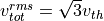 .
.
Matter Loading Transformations
The way profiles are defined, positioned, and oriented, is analogous to the way regions are. In particular, there is a native position and orientation that is modified by applying a set of transformations. See Input File: Geometry for an explanation of the transformations that can be applied.
Specific Matter Loading Profiles
- generate uniform <name> { <directives> }
Generate uniform density within the clipping region.
- Parameters:
name (str) – name of module defining type of matter to load.
directives (block) –
The following directives are supported:
Shared directives: see Matter Loading Shared Directives
- density = n0
- Parameters:
n0 (float) – density to load
- generate piecewise <name> { <directives> }
Generate piecewise varying density within the clipping region. The total density is the product of 4 piecewise functions:

- Parameters:
name (str) – name of module defining type of matter to load.
directives (block) –
The following directives are supported:
Shared directives: see Matter Loading Shared Directives
- tpoints = t_list
- Parameters:
x_list (list) – Variable length list of floating point numbers giving the points at which
 is known, e.g.,
 { 0 , 1.5 , 3.4 , 5.1 }.
- xpoints = x_list
- Parameters:
x_list (list) – Variable length list of floating point numbers giving the points at which
 is known, e.g.,
 { 0 , 1.5 , 3.4 , 5.1 }.
- ypoints = y_list
- Parameters:
y_list (list) – Variable length list of floating point numbers giving the points at which
 is known, e.g.,
 { 0 , 1.5 , 3.4 , 5.1 }.
- zpoints = z_list
- Parameters:
z_list (list) – Variable length list of floating point numbers giving the points at which
is known, e.g., { 0 , 1.5 , 3.4 , 5.1 }.
- tdensity = td_list
- Parameters:
td_list (list) – Variable length list of floating point numbers giving the values of
at the points listed with tpoints.
- xdensity = xd_list
- Parameters:
xd_list (list) – Variable length list of floating point numbers giving the values of
at the points listed with xpoints.
- ydensity = yd_list
- Parameters:
yd_list (list) – Variable length list of floating point numbers giving the values of
at the points listed with ypoints.
- zdensity = zd_list
- Parameters:
zd_list (list) – Variable length list of floating point numbers giving the values of
 at the points listed with
 zpoints.
- shape = my_shape
- Parameters:
my_shape (enum) –
quintic,quartic,triangle
- symmetry = sym
- Parameters:
sym (enum) –
none,cylindrical,spherical. If cylindrical, x-profile is interpreted as radial, z-profile is axial, y is only used to define origin. If spherical, x-profile is radial, y and z are used only to define the origin.
- mode number = nx ny nz
Multiply final profile by
![\left[\cos(n_x x/2)\cos(n_y y/2)\cos(n_z z/2)\right]^2](_images/math/8ee16a98a29282a5ba746a89fd289bd86c6e8b11.png)
- generate channel <name> { <directives> }
Generate density channel within the clipping region. The defining formula is

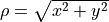
The matched beam condition for spot size
 is
is
where
 is the classical electron radius,
  is arbitrary, and higher terms vanish. The normalization is
where
 is the unit frequency and
  is the unit density. This leads to the matched beam condition in normalized units as
- Parameters:
name (str) – name of module defining type of matter to load.
directives (block) –
The following directives are supported:
- Shared directives:
see Matter Loading Shared Directives
piecewise profile
functionpiecewise profile
shapedirective.
- coefficients = n0 n2 n4 n6
- Parameters:
n0 (float) – see
in defining formulan2 (float) – see
 in defining formula
n4 (float) – see
 in defining formula
n6 (float) – see
 in defining formula
- generate column <name> { <directives> }
Generate density column within the clipping region.

- Parameters:
name (str) – name of module defining type of matter to load.
directives (block) –
The following directives are supported:
- Shared directives:
see Matter Loading Shared Directives
piecewise profile
functionpiecewise profile
shapedirective.
- size = ( sx , sy , sz )
- Parameters:
st (float) –
 in defining formula.
sx (float) – radius of column, per
 in defining formula.
sy (float) – radius of column, per
 in defining formula.
sz (float) – ignored.
- generate gaussian <name> { <directives> }
Generate a Gaussian ellipsoid within the clipping region.

- Parameters:
name (str) – name of module defining type of matter to load.
directives (block) –
The following directives are supported:
Shared directives: see Matter Loading Shared Directives
- density = n0
- Parameters:
n0 (float) – peak density, per defining formula.
- size = ( st, sx , sy , sz )
- Parameters:
st (float) –
in defining formula.sx (float) –
in defining formula.sy (float) –
in defining formula.sz (float) –
in defining formula.
Conducting Regions
Conducting regions serve the following purposes:
Perfect conductors filling arbitrary cells in electromagnetic simulations
Antenna objects in electromagnetic simulations
Impermeable objects filling arbitrary cells in hydrodynamic simulations
Fixed potential objects filling arbitrary cells in electrostatic simulations
Fixed temperature objects filling arbitrary cells in hydrodynamic simulations
- new conductor [<name>] [for <module_name>] { <directives> }
The electrostatic potential can be fixed within the conductor as

The dipole radiator elements oscillate according to
![{\bf P}(t,x,y,z) = {\bf P}_0 S[T(t,x,y)] \sin[\omega T(t,x,y) + \varphi + {\bf k}_s \cdot {\bf r}]](_images/math/64f287d9e7edaad393b0825e2daa38dc995b5cb9.png)

- Parameters:
name (str) – Name given to the conductor
directives (block) –
The following directives are supported:
- Shared directives:
Temporal envelope
 is derived from pulse shape parameters per wave object
- clipping region = name
Rotation of clipping region also rotates current distribution
- Parameters:
name (str) – name of geometric region to use
- temperature = T
- Parameters:
T (float) – The temperature of the conductor can be fixed at T, serving as a dirichlet boundary condition for heat equations. Note that parabolic solver tools default to a homogeneous neumann condition (no heat flow).
- enable electrostatic = tst
- Parameters:
tst (bool) – this conductor will fix the potential
- enable electromagnetic = tst
- Parameters:
tst (bool) – this conductor will reflect EM waves
ANTENNA DIRECTIVES: Currents are driven with dipole oscillators. This avoids problems with static field generation. All the lists must be of equal length. Each list element is an oscillator. The total current is the superposition of the current of each oscillator.
- current type = curr_typ
- Parameters:
curr_typ (enum) – takes values
electric,magnetic, ornone
- potential = lst
Determines
 for each oscillator.
- Parameters:
lst (list) – variable length list of scalar potentials, e.g.,
{ 1.0 , 2.0 }
- px = lst1 , py = lst2 , pz = lst3
Determines
 for each oscillator.
- w = w0
Determines
for each oscillator.
- phase = p0
Determines
for each oscillator.
- f = f0
- Parameters:
f0 (float) – Determines
 parameter that appears in
  . This is supposed to produce a focus at the corresponding distance from the antenna (default = infinity).
- ks = ksx ksy ksz
Apply linear phase variation to create tilted wave (default = 0).
- gaussian size = ( sx , sy , sz )
Apply a gaussian spatial weight to the oscillator amplitudes.
Particle Movers
Particle movers are used with Species modules. As of this writing, there are no adjustable parameters.
There are three types of distinctions among mover tools:
Physics - differing physics models can call for differing mover tools
Dimensionality - optimization for an ignorable y-coordinate, or fully 3D
Algorithm - different discretization schemes
The Species module will automatically choose a mover if none is specified. It does this by looking at the grid, and the data that has been shared by other modules, and deducing the correct dimensionality and physics. The way the discretization scheme is selected favors legacy methods, at present.
Boris Mover
- new boris mover [<name>] [for <module_name>] { <directives> }
This is the long-standing, standard, relativistic, electromagnetic mover. This is used by default if an electromagnetic field is detected, and there are no quantum or enveloped fields.
This mover is also selected if there is an electrostatic field solver. The electrostatic solver must provide the magnetic field, but may set it to zero.
There are no directives.
Higuera-Cary Mover
- new hc mover [<name>] [for <module_name>] { <directives> }
This is a variation on the Boris mover that uses an estimate for the energy at the half-step that is thought to be more accurate. This is never chosen by default.
There are no directives.
PGC Mover
- new pgc mover [<name>] [for <module_name>] { <directives> }
This is an extension of the Boris mover to account for the ponderomotive guiding center approximation. This is chosen if an enveloped field solver is detected.
There are no directives.
Unitary Mover
- new unitary mover [<name>] [for <module_name>] { <directives> }
This is an alternative to the Boris mover, which is believed to be more accurate for ultra-relativistic parameters. This is never chosen by default.
There are no directives.
Bohmian Mover
- new bohmian mover [<name>] [for <module_name>] { <directives> }
This moves particles using the Bohmian guidance condition. This is used to create Bohmian trajectories with the quantum optics modules. It is created automatically if a quantum propagator is detected.
Elliptic Solvers
All elliptic solvers share the following directives:
- <coord>boundary = ( <bc1> , <bc2> )
- Parameters:
coord (enum) – can be
x,y,zbc1 (enum) – boundary condition on lower side, can be
open,dirichlet,neumann.bc2 (enum) – boundary condition on lower side, can be
open,dirichlet,neumann.
Inhomogeneous boundary conditions are implemented by using conductor tools to fix the potential. For external boundaries, the conductor must occupy the far ghost cells.
Iterative Solver
- new iterative elliptic [<name>] [for <module_name>] { <directives> }
Uses successive over-relaxation to iteratively solve the elliptic equation. This solver is slow, but flexible. There is no limit on the topology of the boundary conditions, and arbitrary coordinates are supported. The following directives are supported:
Shared directives: see base elliptic solver
- tolerance = <tol>
- Parameters:
tol (float) – iterate until the residual is reduced to this level
- overrelaxation = <ov>
- Parameters:
ov (float) – overrides the default overrelaxation parameter (not generally recommended)
FACR Solver
- new facr elliptic [<name>] [for <module_name>] { <directives> }
Uses Fourier analysis is in the transverse directions. This solver is fast, but boundary conditions can only be imposed on constant z-surfaces, and Cartesian coordinates are required. The following directives are supported:
Shared directives: see base elliptic solver
Eigenmode Solver
- new eigenmode elliptic [<name>] [for <module_name>] { <directives> }
Uses generalized spectral resolution of the transverse coordinates. This solver works in arbitrary coordinates, and is fast as long as the transverse modes are truncated. Boundary conditions can only be imposed on constant z-surfaces. The following directives are supported:
Shared directives: see base elliptic solver
- modes = <N>
- Parameters:
N (int) – The number of transverse modes to keep. The modes are taken from an ordered list, sorted by magnitude of the eigenvalue.
Laser Propagator
Forward Propagator
- new forward propagator [<name>] [for <module_name>] { <directives> }
This is an accurate propagator, but the axial integration is serial.
PhotoIonization
Multi-photon Ionization
Model appropriate for low fields or high frequencies.
- new multiphoton ionization [<name>] [for <module_name>] { <directives> }
The following directives are supported:
Shared directives: see above
- reference field = E0
- Parameters:
E0 (float) –
 , where the MPI rate is proportional to
ADK Tunneling Ionization
Model appropriate for high fields or low frequencies, and arbitrary atomic states.
- new adk ionization [<name>] [for <module_name>] { <directives> }
The following directives are supported:
Shared directives: see above
- orbital number = l
- Parameters:
l (int) – the orbital quantum number of the state
- orbital projection = m
- Parameters:
m (int) – the projection of the orbital quantum number in the direction of the field
- effective orbital number = lstar
- Parameters:
lstar (float) – effective orbital quantum number
PPT Tunneling Ionization
This model evaluates the general PPT formula in the tunneling limit. Differs from ADK only in that the gamma function in the bound state coefficient is not approximated.
- new ppt tunneling [<name>] [for <module_name>] { <directives> }
The following directives are supported:
Shared directives: see above
- orbital number = l
- Parameters:
l (int) – the orbital quantum number of the state
- orbital projection = m
- Parameters:
m (int) – the projection of the orbital quantum number in the direction of the field
- effective orbital number = lstar
- Parameters:
lstar (float) – effective orbital quantum number
KYH Tunneling Ionization
Model appropriate for high fields or low frequencies, based on a Coulomb corrected strong field approximation, and with relativistic corrections.
- new kyh ionization [<name>] [for <module_name>] { <directives> }
The following directives are supported:
Shared directives: see above
PPT Photoionization
Cycle-averaged model that works across multi-photon and tunneling regimes (convergence in tunneling regime is slow). Assumes the projection of the orbital angular momentum in the direction of the field vanishes. Cannot be used for ionization due to carrier-resolved fields, i.e., must be used with an enveloped field solver.
- new ppt ionization [<name>] [for <module_name>] { <directives> }
The following directives are supported:
Shared directives: see above
- orbital number = l
- Parameters:
l (int) – the orbital quantum number of the state
- effective orbital number = lstar
- Parameters:
lstar (float) – effective orbital quantum number
- terms = n
- Parameters:
n (int) – number of terms to keep in the PPT expansion.
PMPB Photoionization
Similar to the PPT model, except the Coulomb correction is improved in the multiphoton limit. In the original paper the orbital and effective orbital numbers are set to zero.
- new pmpb ionization [<name>] [for <module_name>] { <directives> }
The following directives are supported:
Shared directives: see above
- orbital number = l
- Parameters:
l (int) – the orbital quantum number of the state
- effective orbital number = lstar
- Parameters:
lstar (float) – effective orbital quantum number
- terms = n
- Parameters:
n (int) – number of terms to keep in the PPT expansion.
Equation of State Tools
Equation of State (EOS) models are needed for hydrodynamics simulation. EOS models are encapsulated in tool objects that can be attached to appropriate modules in the usual way.
- new eos ideal gas tool [<name>] [for <module_name>] { <directives> }
Directs a module to use the ideal gas equation of state. No directives.
- new eos hot electrons [<name>] [for <module_name>] { <directives> }
Directs a module to use the ideal gas equation of state along with Braginskii electron transport coefficients. No directives.
- new eos simple mie gruneisen [<name>] [for <module_name>] { <directives> }
Directs a module to use the simplified mie-gruneisen equation of state. The following directives are supported:
- gruneisen parameter = grun
- Parameters:
grun (float) – the gruneisen parameter relating density, temperature, and pressure
- new eos linear mie gruneisen [<name>] [for <module_name>] { <directives> }
Directs a module to use the linear Hugoniot-based mie-gruneisen equation of state.
The following directives are supported:
- gruneisen parameter = grun
- Parameters:
grun (float) – the gruneisen parameter relating density, temperature, and pressure
- reference density = nref
- Parameters:
nref (float) – the reference density for the Hugoniot data
- hugoniot intercept = c0
- Parameters:
c0 (float) – y-intercept of the Hugoniot curve, typically the speed of sound
- hugoniot slope = s1
- Parameters:
s1 (float) – slope of the Hugoniot curve at the reference density
Diagnostics
Note
If a diagnostic tool is not explicitly attached to any module, it will be automatically attached to all modules. This is an optimization based on the observation that one would often like a similar type of output from all modules.
Diagnostic Formats
TurboWAVE binaries are in numerical Python (numpy) format (extension .npy). All metadata is in the file tw_metadata.json. Text files are generally tab delimited tables of ASCII data, with a one-line header containing column labels.
Box diagnostics produce a .npy file containing a four-dimensional array with axes (t,x,y,z). Phase space diagnostics write a similar array, but the axes can have different meanings. The grid data is found by looking up the 'grid' key. This returns a string with the name of the grid file containing the mesh point and time level information:
t = <t0>
axis1 = <x1> <x2> ... <xN>
axis2 = <y1> <y2> ... <yN>
axis3 = <z1> <z2> ... <zN>
<...more frames>
For static grids, the additional frames only have the line giving the elapsed time.
The orbit diagnostic produces a .npy file containing the detailed particle information:
Particle record 1 at time level 1
Particle record 2 at time level 1
...more particle records at time level 1
Particle record N at time level 1
Time level separator
Particle record 1 at time level 2
Particle record 2 at time level 2
...more particle records at time level 2
Particle record M at time level 2
...more time level separators and particle records
Each particle record is an 8 element vector (x,px,y,py,z,pz,aux1,aux2). The order of the particles within a time level is not significant. Particles must be identified by unique values of aux1 and aux2. The time level separator is a record with all zeros. Valid particles can never have aux1 = aux2 = 0.
Example Post-processing Script
Typical Python post-processing scripts begin like this:
import numpy as np
import json
import pathlib

my_path = pathlib.Path.home() / 'Run'
# Get a field component into a 4D numpy array with shape (t,x,y,z)
Ex = np.load(my_path / 'Ex.npy')
# Load the metadata into a dictionary (all metadata)
with open(my_path / 'tw_metadata.json','r') as f:
        meta = json.load(f)
# As an example of metadata, get the conversion factor to mks units.
# Note axis mapping, 0=t, 1=x, 2=y, 3=z, 4=data
mks_factor = meta['Ex.npy']['axes']['4']['mks multiplier']
# Get the name of the grid file
grid_file_name = meta['Ex.npy']['grid']
The grid data is a text file. One way to read it is with the following function:
def get_mesh_pts(grid_file_path,dims):
    """Try to find a grid warp file matching the npy file.
    If the file is found return [tmesh,xmesh,ymesh,zmesh].
    Each element is a list of the mesh points along the given axis.
    If the file is not found return unit length uniform mesh.
    Arguments: grid_file_path = pathlike, name of grid file.
               dims = expected shape of the data"""
    try:
        ans = [[],[],[],[]]
        with open(grid_file_path) as f:
            for line in f:
                l = line.split(' ')
                if l[0]=='t':
                    ans[0] += [float(l[-1])]
                if l[0]=='axis1' and len(ans[1])==0:
                    ans[1] = [float(x) for x in l[2:]]
                if l[0]=='axis2' and len(ans[2])==0:
                    ans[2] = [float(x) for x in l[2:]]
                if l[0]=='axis3' and len(ans[3])==0:
                    ans[3] = [float(x) for x in l[2:]]
        if len(ans[0])==dims[0] and len(ans[1])==dims[1] and len(ans[2])==dims[2] and len(ans[3])==dims[3]:
            return [np.array(ans[0]),np.array(ans[1]),np.array(ans[2]),np.array(ans[3])]
        else:
            warnings.warn('Grid file found but wrong dimensions ('+grid_file_path+').')
            return [np.linspace(0.0,1.0,dims[i]) for i in range(4)]
    except FileNotFoundError:
        warnings.warn('No grid file found ('+grid_file_path+').')
    except PermissionError:
        warnings.warn('Ignoring grid file ('+grid_file_path+') due to permissions.')
    return [np.linspace(0.0,1.0,dims[i]) for i in range(4)]
Diagnostics Shared Directives
The following directives may be used with any diagnostic
- filename = f
- Parameters:
f (str) – name of the file to write. Actual file names may be prepended with the name of some subset of the overall data associated with the diagnostic (some diagnostics write multiple files). This may be postpended with a filename extension such as
.txtor.npy. The special namefullcauses the files to have only the prepended string and the extension in their names. This is the default.
- clipping region = name
write data only within the specified geometric region. See Input File: Geometry for documentation on creating complex geometric regions. For some diagnostics there is a restriction on the complexity of the region.
- Parameters:
name (str) – the name of the geometric region to use
- t0 = start_time
- Parameters:
start_time (float) – time at which diagnostic write-out begins (default=0).
- t1 = stop_time
- Parameters:
stop_time (float) – time after which diagnostic write-out ends (default=infinity).
- period = steps
- Parameters:
steps (int) – number of simulation cycles between write-outs.
- time period = duration
- Parameters:
duration (float) – simulated time between write-outs, overrides
periodif specified. If an adaptive time step is in use, this can approximate uniform spacing of write-outs.
- galilean velocity = (vx,vy,vz)
Transform output to a Galilean frame, i.e.,
 . This transformation can be combined with a boosted frame.
- Parameters:
vx (float) – x-component of the galilean transformation velocity
vy (float) – y-component of the galilean transformation velocity
vz (float) – z-component of the galilean transformation velocity
- boost = (gbx,gby,gbz)
This is a request to unboost data generated in a boosted frame. As of this writing it is only implemented for orbit and phase space diagnostics, and there are some limitations (see below).
- Parameters:
gbx (float) – component of 4-velocity in x-direction
gby (float) – component of 4-velocity in y-direction
gbz (float) – component of 4-velocity in z-direction
Specific Diagnostics
- new box diagnostic [<name>] [for <module_name>] { <directives> }
Write out grid data as sequence of frames. Clipping region must be a simple box. This diagnostic produces several files per module, by default.
- Parameters:
directives (block) –
The following directives are supported:
Shared directives: see Diagnostics Shared Directives
- average = tst
- Parameters:
tst (bool) – average over sub-grid, or not. If not, diagnose lower corner cell only.
- skip = ( sx , sy , sz )
Defines a reduced grid produced by downsampling the full grid. The reduction factor is the product of the three skipping parameters. Note the centroid of the sampling points is shifted.
- Parameters:
sx (int) – advance this many cells in the x-direction between writes
sy (int) – advance this many cells in the y-direction between writes
sz (int) – advance this many cells in the z-direction between writes
- reports = { <fields> }
- Parameters:
fields (list) – Put a list of fields to get restricted output. If omitted then all available fields are written.
- new energy diagnostic [<name>] [for <module_name>] { <directives> }
Diagnostic of volume integrated quantities. Normalization includes the unit of particle number.
- Parameters:
directives (block) –
The following directives are supported:
Shared directives: see Diagnostics Shared Directives
- precision = digits
- Parameters:
digits (int) – number of digits used to represent each result
- new point diagnostic [<name>] [for <module_name>] { <directives> }
Diagnostic to write out grid data at a specific point.
- Parameters:
directives (block) –
The following directives are supported:
Shared directives: see Diagnostics Shared Directives
- point = (Px,Py,Pz)
Coordinates of the point to diagnose. This is subject to the Galilean transformation (see Diagnostics Shared Directives).
- new phase space diagnostic [<name>] [for <module_name>] { <directives> }
Diagnostic to write out up to 3D phase space projections. Setting a dimension to 1 produces a lower dimensional projection. The
boostparameter can be used to put the data in the lab frame. It is important to note that if this is done, the frame write-out index still slices time in the boosted frame. On the other hand, explicit time axes are properly transformed.- Parameters:
species_name (str) – the name of the species to diagnose
directives (block) –
The following directives are supported:
Shared directives: see Diagnostics Shared Directives
- axes = (ax1,ax2,ax3)
Determines the axes of the phase space. Axes can be any of
t,x,y,z,mass,px,py,pz,g,gbx,gby,gbz. If a dimension collapses to 1, the axis is ignored, but still must be specified.- Parameters:
ax1 (enum) – the phase space variable to associate with axis 1
ax2 (enum) – the phase space variable to associate with axis 2
ax3 (enum) – the phase space variable to associate with axis 3
- dimensions = (N1,N2,N3)
- Parameters:
N1 (int) – cells along axis 1
N2 (int) – cells along axis 2
N3 (int) – cells along axis 3
- bounds = (x0,x1,y0,y1,z0,z1)
Boundaries of the interrogation region. In boosted frame simulations, these can be specified in the lab frame by setting
boost.- Parameters:
x0 (float) – lower bound for axis 1
x1 (float) – upper bound for axis 1
y0 (float) – lower bound for axis 2
y1 (float) – upper bound for axis 2
z0 (float) – lower bound for axis 3
z1 (float) – upper bound for axis 3
- accumulate = acc
- Parameters:
acc (bool) – if true the phase space data accumulates, otherwise write-out frames are resolved (default=false). This is especially useful for boosted frames.
- new orbit diagnostic [<name>] [for <module_name>]
Diagnostic to write out full phase space data of the particles. In boosted frame simulations, data can be put in the lab frame by setting
boost. Note however that the time separators in the data file lose their meaning in this case.Caution
Orbit diagnostics can create excessively large files if not used carefully. To avoid this, define a species with a small number of test particles and use this on them.
- Parameters:
species_name (str) – the name of the species to diagnose
directives (block) –
The following directives are supported:
Shared directives: see Diagnostics Shared Directives
- minimum gamma = gmin
- Parameters:
gmin (float) – only save data for particles with gamma greater than this. In boosted frame simulations, this can be specified in the lab frame by setting
boost.